


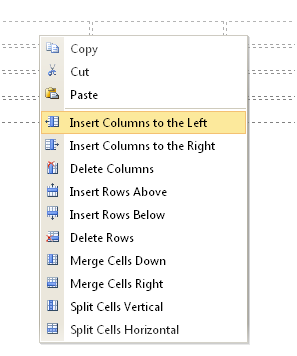
WebTextEditor also provides comprehensive table editing commands, such as listed below.
- Insert columns to the left
Add new column to the left of focused cell. - Insert columns to the right
Add new column to the right of focused cell. - Delete columns
Delete focused cell column. - Insert Rows Above
Add new row to above focused cell. - Insert Rows Below
Add new row below focused cell. - Delete Rows
Delete focused cell row. - Merge Cells Down
Merge focused cell with cell which position below focused cell. - Merge Cells Right
Merge focused cell with cell which position in the right of focused cell. - Split Cells Vertical
Split focused cell vertically. - Split Cells Horizontal
Split focused cell horizontally
 |
In order to perform table editing in WebTextEditor, user should select on a table's cell and open Table Designer task pane. Alternatively, it can also be done through context menu. |